You unlock your phone, swipe into battery settings, and spot an unfamiliar entry — org.codeaurora.ims — sipping power quietly in the background. It looks like a jumble of code, maybe even a stubborn piece of bloatware or something worse. Breathe easy. That cryptic label belongs to one of the most essential communication engines inside your Android device, the very brain behind crystal-clear VoLTE calls, seamless Wi‑Fi Calling, and advanced messaging features.
This FAQ unpacks everything you need to know about org.codeaurora.ims in plain, friendly language. You’ll learn why it appears on your phone, what it does with your permissions, if it can safely be disabled, and how to solve common battery or data concerns without turning off the features you rely on every day.
What exactly is org.codeaurora.ims on Android?
org.codeaurora.ims is a system-level Android package that implements the IP Multimedia Subsystem (IMS) stack, originally developed as part of Qualcomm’s CodeAurora open-source initiative. In everyday terms, it’s the software layer that lets your phone treat voice calls, video chats, and SMS as data packets over LTE and Wi‑Fi — instead of relying solely on old-fashioned circuit-switched networks. Without this invisible helper, features like VoLTE (Voice over LTE), ViLTE (Video over LTE), Wi‑Fi Calling, and Rich Communication Services (RCS) simply would not function on Snapdragon-powered phones.
You can think of org.codeaurora.ims as a translator and traffic controller. When you place a call over 4G or Wi‑Fi, this service negotiates with your carrier’s network to establish a stable, secure IP-based session, manages quality of service, and ensures your voice reaches the other side with minimal delay. It’s tightly integrated into the phone’s modem firmware and telephony framework, which is why it often shows up under system processes rather than regular apps.
Why do I see org.codeaurora.ims in my battery usage list?
Seeing org.codeaurora.ims in battery stats is perfectly normal, especially if you use Wi‑Fi Calling or make many VoLTE calls. Because the IMS service continuously monitors for incoming calls, maintains a signaling connection with the carrier’s IMS core, and occasionally refreshes its registration, it naturally consumes a small amount of power. On a typical day this drain hovers around 1–3%, comparable to other telephony components.
If you notice an unusually high percentage — say above 5% — your device might be struggling to maintain an IMS connection due to poor Wi‑Fi signal, frequent network switching, or a carrier configuration glitch that forces repeated re-registrations. The battery list isn’t alarming you about malware; it’s simply giving you transparency into how your phone’s communication backbone uses energy.
Is org.codeaurora.ims a virus or malware?
No, org.codeaurora.ims is absolutely not a virus, spyware, or malicious program. It is a legitimate, digitally signed system package that ships with the firmware of virtually every phone running a Qualcomm Snapdragon chipset and supporting modern 4G/LTE and 5G voice services. Because it resides in the protected system partition and holds privileged telephony permissions, it cannot be installed by third-party apps or disguised by attackers without altering the operating system itself.
The confusion often comes from its technical-looking name and the fact that it operates invisibly. Legitimate system processes rarely sport friendly, branded labels. If you’re still concerned, you can verify the package’s digital signature under Android’s developer settings — it should match your device manufacturer and contain the CodeAurora certificate chain, confirming its authenticity straight from the factory.
What permissions does org.codeaurora.ims require?
org.codeaurora.ims needs a handful of high-privilege permissions to handle real-time communication, but it uses them strictly for telephony functions. These include access to the phone state (to manage incoming/outgoing calls), the ability to use the microphone and earpiece for voice, network access for both mobile data and Wi‑Fi, and the right to modify system settings related to call routing and audio paths. On Android 10 and above, you may see these grouped under broad categories like “Phone,” “Microphone,” and “SMS.”
Importantly, the IMS service does not interact with your location, contacts, or camera outside of the direct call context. Its permissions are granted at the system level during manufacturing and cannot be revoked through the standard app permissions interface without rooting the device — a deliberate design choice to prevent users from accidentally breaking core calling features.
Can I disable or uninstall org.codeaurora.ims?
You can disable org.codeaurora.ims through the hidden “IMS Service” app in Android’s system settings, but doing so will instantly break VoLTE, Wi‑Fi Calling, and any other IMS-dependent feature. Your phone may fall back to 3G or 2G for voice calls, resulting in noticeably lower call quality, slower data during calls, and loss of simultaneous voice and data on some networks. There is no “uninstall” option because it is baked into the system image.
If you are determined to stop it temporarily — perhaps to troubleshoot — you can force-stop the service or clear its data, but these actions will only last until the next reboot or until the phone automatically restarts the IMS stack. In almost all cases, leaving org.codeaurora.ims enabled is the only way to enjoy the modern calling experience your carrier and handset were designed to deliver.
Why is org.codeaurora.ims using mobile data or Wi‑Fi in the background?
Even when you’re not actively making a call, org.codeaurora.ims exchanges tiny “keep-alive” packets with your carrier’s IMS servers over Wi‑Fi or mobile data. This background chatter ensures that the network knows your device is reachable for incoming VoLTE or Wi‑Fi calls and that the secure SIP registration hasn’t expired. The amount of data is minuscule — typically less than a few kilobytes per hour — and should never push you over a data cap.
If you notice a significant spike in background data, it’s usually a sign that the IMS registration is repeatedly failing and retrying. Common triggers include unstable Wi‑Fi connections, aggressive battery savers that close the socket, or outdated carrier settings. In such cases, refreshing your network settings or installing a pending system update often brings the data usage back to normal, imperceptible levels.
How does org.codeaurora.ims relate to VoLTE and Wi‑Fi Calling?
VoLTE and Wi‑Fi Calling are two of the most visible features that rely entirely on org.codeaurora.ims. When your phone displays an “HD” or “VoLTE” icon during a call, it’s the IMS service that set up that high-definition voice path. It negotiates the codec, assigns the necessary bandwidth, and seamlessly hands the call over between LTE and Wi‑Fi if you move out of range — a feature known as Voice Call Continuity. In short, org.codeaurora.ims is the engine that makes “HD voice” sound as crisp and natural as a face-to-face conversation.
For Wi‑Fi Calling, the IMS service builds a secure tunnel from your phone to the carrier’s core network over the public internet, using IPsec encryption. This means you can place a crystal-clear call from a basement or a rural cabin as long as you have a decent Wi‑Fi signal — and the very package orchestrating that magic is org.codeaurora.ims. Without it, your phone would be limited to the coverage footprint of cellular towers alone.
How can I troubleshoot high battery drain from org.codeaurora.ims?
Start with the simplest fix: reboot your device. A fresh boot clears transient IMS registration errors and resets stuck timers. If the drain continues, head to Settings > System > Reset options and choose “Reset Wi‑Fi, mobile & Bluetooth” — this will not erase your personal data but will delete cached network credentials and force a clean IMS registration. After the reset, reconnect to Wi‑Fi and let the phone sit for a few minutes while it re-establishes the IMS session.
If the problem persists, check for carrier services updates in the Play Store and install any pending system OTA updates from your manufacturer. Some carriers push separate “IMS settings” updates. You can also experiment by temporarily turning off Wi‑Fi Calling when you have strong cellular coverage, just to see if the battery graph flattens. As a last resort, contact your carrier for a fresh SIM card or eSIM profile, because an outdated SIM can cause repeated IMS authentication loops that hammer the battery.
Does org.codeaurora.ims collect or transmit my personal data?
org.codeaurora.ims processes call-specific data such as your phone number, device ID, and IP address, but it does this exclusively to set up and maintain carrier-grade voice and messaging services. The information is sent directly to your mobile network operator’s IMS infrastructure, not to Qualcomm or a third-party ad network. The entire communication channel is encrypted end-to-end at the IPsec level, meaning even public Wi‑Fi hotspots cannot eavesdrop on your call metadata.
Android’s privacy controls and the IMS specification prevent the service from harvesting your contact list, location, photos, or browsing history. If you’re still uneasy, you can verify the service’s network activity using a firewall app that logs connections — you’ll see only short exchanges with your carrier’s fully qualified domain names, never with dubious servers. Your privacy remains firmly in your hands.
I see org.codeaurora.ims has stopped or keeps crashing — what should I do?
An occasional “IMS Service has stopped” popup usually stems from a modem firmware mismatch after a system update or from installing an incompatible custom ROM. The fastest remedy is to clear the application data for IMS Service: go to Settings > Apps > Show system, locate “IMS Service” or “org.codeaurora.ims,” tap Storage, and choose “Clear Data.” Don’t worry — this only wipes temporary registration tokens, and the service will rebuild them automatically after a restart.
If crashes recur, boot into safe mode to rule out third-party interference. Persistent instability often points to a deeper modem-software issue that requires a reflash of the stock firmware or a specific “modem” partition update from your device manufacturer. Carrier-specific IMS profiles can also become corrupted, so obtaining a fresh carrier settings file from your provider’s support site frequently eliminates the crashing loop for good.
5 Essential Tips for Managing org.codeaurora.ims Performance
1. Keep Your Carrier Services and Modem Firmware Up-to-Date
Open the Play Store and ensure “Carrier Services” is updated to the latest version. Additionally, install every system update your phone manufacturer releases, as these often contain IMS bug fixes, improved authentication flows, and more efficient keep-alive algorithms that directly reduce battery impact from org.codeaurora.ims.
2. Toggle Wi‑Fi Calling Strategically During Weak Signal
If you’re in a location with spotty Wi‑Fi, the IMS service may frantically reconnect, draining battery. Simply swipe down the quick settings tile and disable Wi‑Fi Calling until you return to a stable network. Your calls will switch back to VoLTE seamlessly without interrupting core IMS functionality.
3. Reset Network Settings After Major OS Updates
Every major Android upgrade can leave behind stale IMS configuration caches. Immediately after an OS version jump, perform a quick network settings reset. This forces org.codeaurora.ims to download fresh IMS certificates and registration parameters from your carrier, preventing the silent battery drain that plagues upgraded phones.
4. Avoid Aggressive Third-Party Battery Optimizers
Some “battery saver” apps aggressively kill background processes including IMS, causing it to restart repeatedly — which uses more power than simply letting it run. Exempt “Phone Services” and “IMS Service” from any automatic optimization list, and trust Android’s built-in adaptive battery to manage the process gently.
5. Test with a Fresh SIM Card if Problems Persist
An aging SIM card with outdated IMS parameters can trigger constant re-authentication attempts. Visit your carrier store and request a modern nano-SIM or convert to eSIM. The new card will carry the latest IMS provisioning data, often wiping out unexplained high drain and dropouts overnight.
Embracing Your Phone’s Invisible Communicator
org.codeaurora.ims might look like a mysterious code name, but it’s the quiet hero that turns your Android device into a versatile communication hub. Understanding what it does — and how to gently coax better performance from it — lets you enjoy high-definition calls, Wi‑Fi connectivity in dead zones, and next-generation messaging without fear. Instead of disabling it, give this unsung IMS engine the small optimizations it deserves, and your phone will answer every call beautifully.
What Is Org.codeaurora.ims

3月31日~4月3日「特別内見会」開催のお知らせ

「4月」のタイトル・見出し文字|イラスト
![[畅玩服]《梦幻西游》电脑版4月3日开服公告:苏堤春晓_ 《梦幻西游》电脑版官方网站 - 网易西游题材扛鼎之作](https://nie.res.netease.com/r/pic/20260327/5428bf62-37c5-4b40-83f5-9e54ae49ae28.png)
[畅玩服]《梦幻西游》电脑版4月3日开服公告:苏堤春晓_ 《梦幻西游》电脑版官方网站 – 网易西游题材扛鼎之作

PG | アーティスト・作品 | エイベックス・ポータル
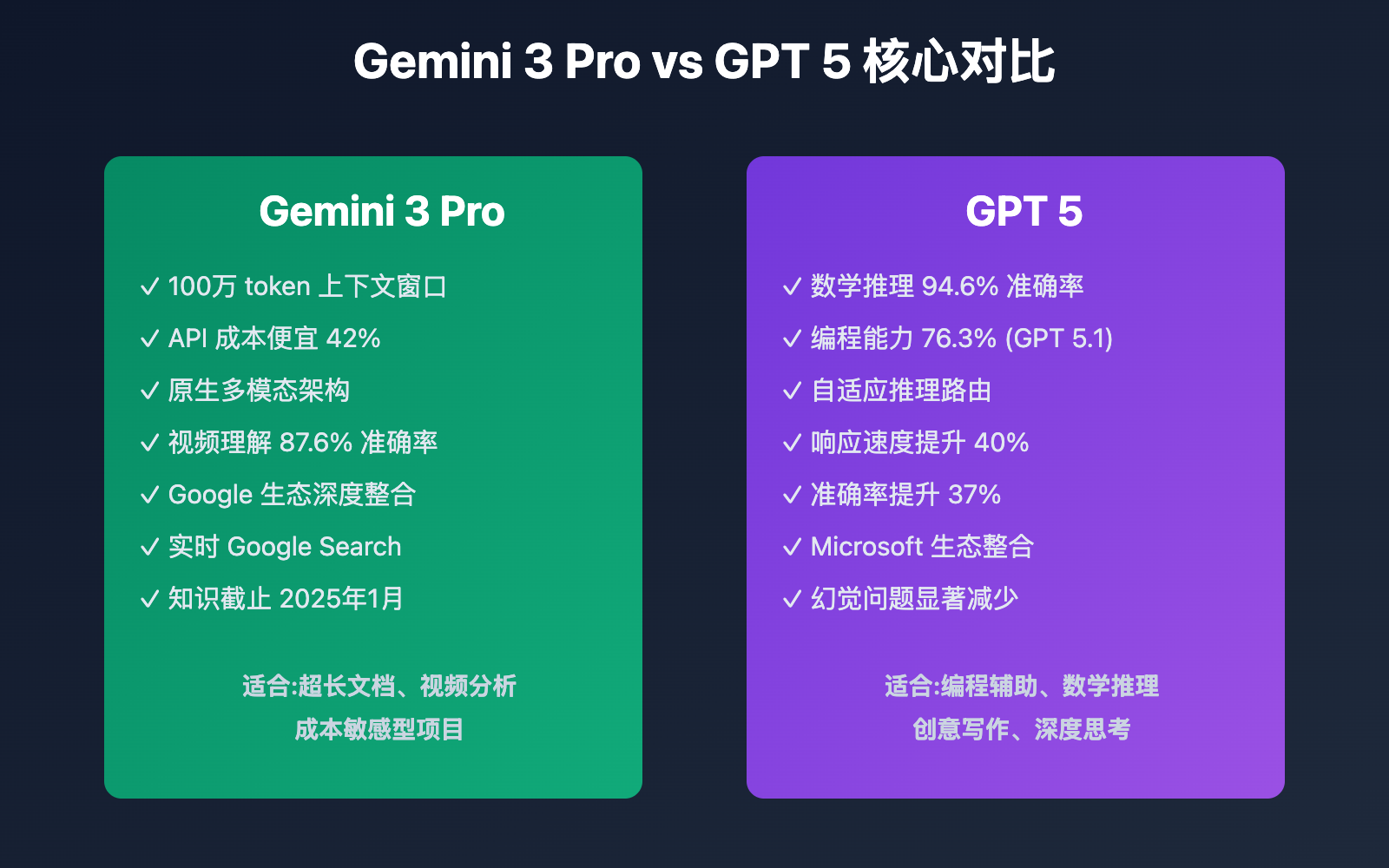
Gemini 3 Pro vs GPT 5: Comprehensive Comparison Across 6 Key Dimensions

2026年 A4横・4月始まり|業務用年間カレンダー(白黒・Excel無料) | 無料カレンダー大全

2025年4月1日:本日発売のコミック新刊 | ほんのひきだし

『ライアーゲーム』ティザービジュアル第2弾&PV公開!出演声優に仁見紗綾・大塚剛央 | アニメイトタイムズ

2025年4月3日のヘッドラインニュース – GIGAZINE

Benefits Of Gami Injectors at James Roush blog

TikTokで話題の小中学生・PG、春休みに初のリリイベ開催決定!3rd &4thシングルのリリース記念。 | ニュース | エイベックス・ポータル

桃の節句はなぜ3月3日?桃が咲かない理由と旧暦の関係 | CoCoRo

2025年4月3日のヘッドラインニュース – GIGAZINE
2024年4月3日 EFT アップデート情報 | タルコフ情報省

4月のテンプレート」をダウンロード – 自由が丘スタイル

4月3日 交付 | RVA

《地平线:零之曙光 复刻版》公布 10月31日发售

3月の無料イラスト素材集|ひな祭り・卒園式・かわいいフリー素材

2026年の卓上カレンダー(5月・6月)は月曜始まり♪かわいい書き込みしやすい日付欄大きめのA4無料素材♪(2026-001005-0631

誤飲予防のための玩具の選び方|乳幼児を守る安全な環境づくり – 保育士「しの」のブログ

PGE wybrała wykonawcę szczytowych elektrowni gazowych w Rybniku oraz